
UTM Source Hyperlink Generator
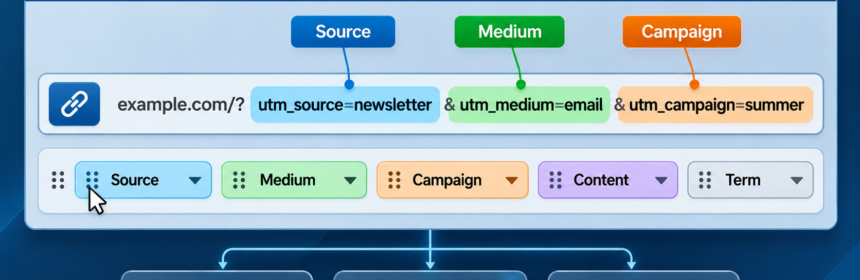
Field order
Drag a dotted handle to lift a field; the blue gap shows where it will be placed. You can also use the arrow buttons. The generated URL follows this order; Destination URL always stays first.
Standard UTM fields
Select the fields to show in the generator. Destination URL is always shown.
Custom URL parameters
Add your own parameter names (for example, ref or partner_id). These are ordinary URL parameters, not standard UTM fields.
What is a UTM link?
A UTM link is an ordinary web address with tracking labels added to it. These labels help the destination website identify which sources, campaigns or links brought visitors to it, provided its analytics system records UTM parameters.
What each field means
- Destination URL: The webpage you want people to visit, including
https://. - Source: Where the visitor comes from, such as
example-siteornewsletter. - Medium: The type of link or channel, such as
referral,emailorsocial. - Campaign: A name grouping related links, such as
spring-promotion. - Content (optional): Distinguishes links within the same campaign, such as
header-buttonversusfooter-link. - Term (optional): Usually identifies a paid-search keyword; it can be left blank for ordinary website links.
- Custom fields: Add nonstandard query parameters required by a destination service. They are not automatically interpreted as UTM campaign data by analytics tools.
How to use it
- Use Settings to choose fields and add custom parameters. Use Reorder fields to arrange them; this also sets their order in the generated URL. Apply your changes to save them in this browser.
- Enter the destination URL and your tracking values, or use the example buttons to see how they work.
- Copy the generated hyperlink and use it in a website button, post, email or other link.
- Check the destination website’s analytics reports to see traffic attributed to your UTM labels.
Tip: Use consistent lowercase names, such as example-site, rather than alternating between different spellings. UTM tags do not track visitors by themselves; the destination needs compatible analytics. Avoid putting personal or confidential information in these fields, since the values appear in the URL.
